
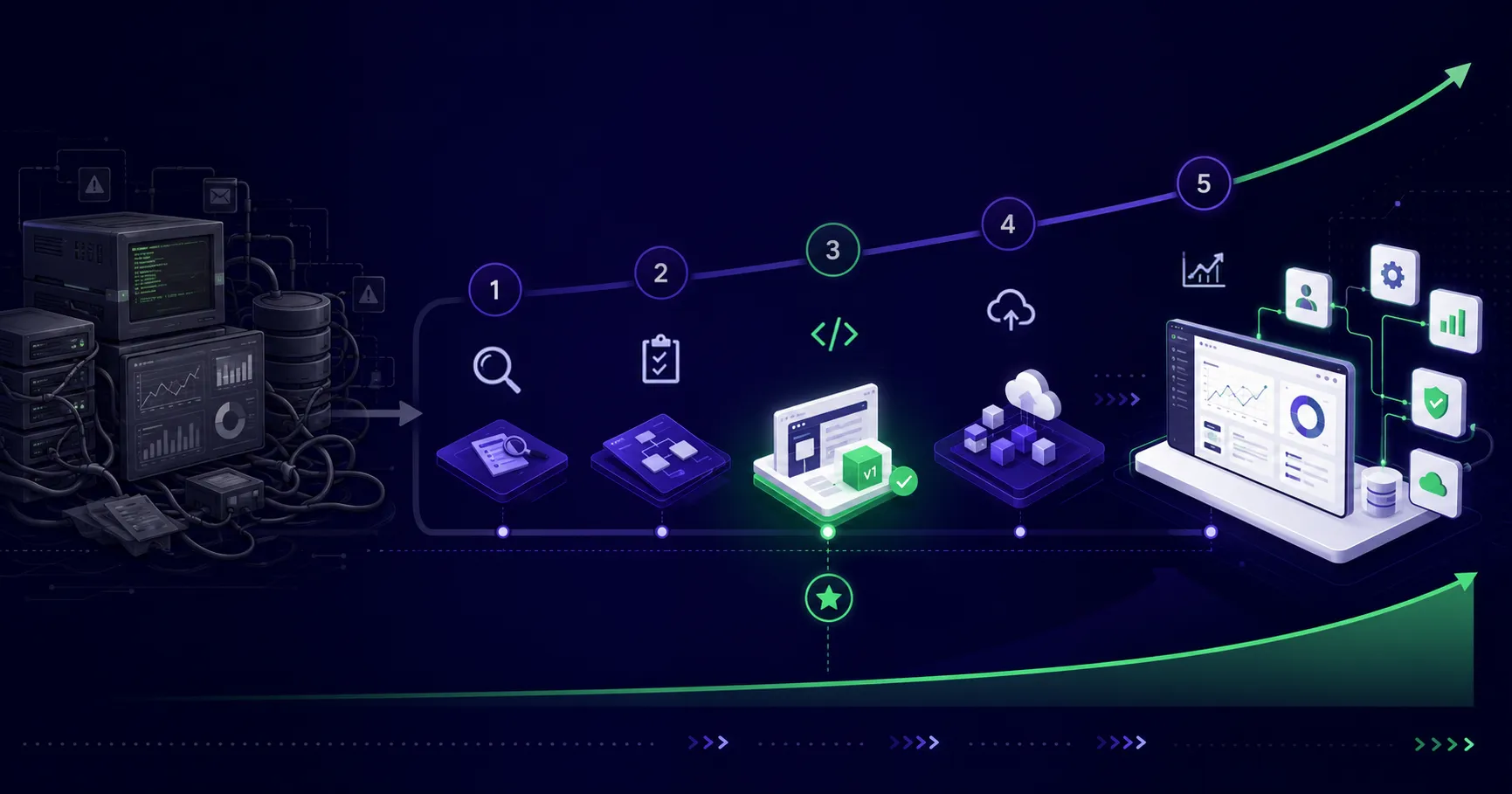
Legacy Modernisation at a Glance
- Single component: 2–4 months.
- Mid-complexity system with 3–5 modules: 6–12 months.
- Complex multi-system modernisation: 12–24 months.
- First value from any of these: 2–4 months.
The Short Answer (and Why It Varies)
Three factors determine where your project lands in that range. Knowing where your project sits on each of these three dimensions is usually enough to get a realistic estimate before the assessment even begins.
System complexity. A standalone Access database with one set of users and clean data is a project very different from a legacy ERP with five interconnected modules, years of custom VBA logic, and integrations to three external systems. Complexity multiplies in every phase.
Data quality. If you are migrating well-structured, consistent data from a legacy system to a new one, that is a manageable task. If you are migrating a decade of inconsistent records, duplicate entries, missing fields, and formatting that has drifted across multiple manual processes, this adds weeks to every component.
Decision-making speed. When projects stall, it usually happens because the company is unable to make important decisions quickly, such as sign-off on architecture choices, approval of a migration approach, or availability of the people who know how the system works. Timelines are more consistently extended by internal bottlenecks than technical complexity.
| Scenario | Complexity | Typical Timeline | First Value |
|---|---|---|---|
| Single module or simple system | Low | 3–4 months | Month 3 |
| Mid-complexity ERP (3–5 modules) | Medium | 6–12 months | Month 3 |
| Multi-system modernisation | High | 14–20 months | Month 3–4 |
The 5 Phases of Legacy Modernisation
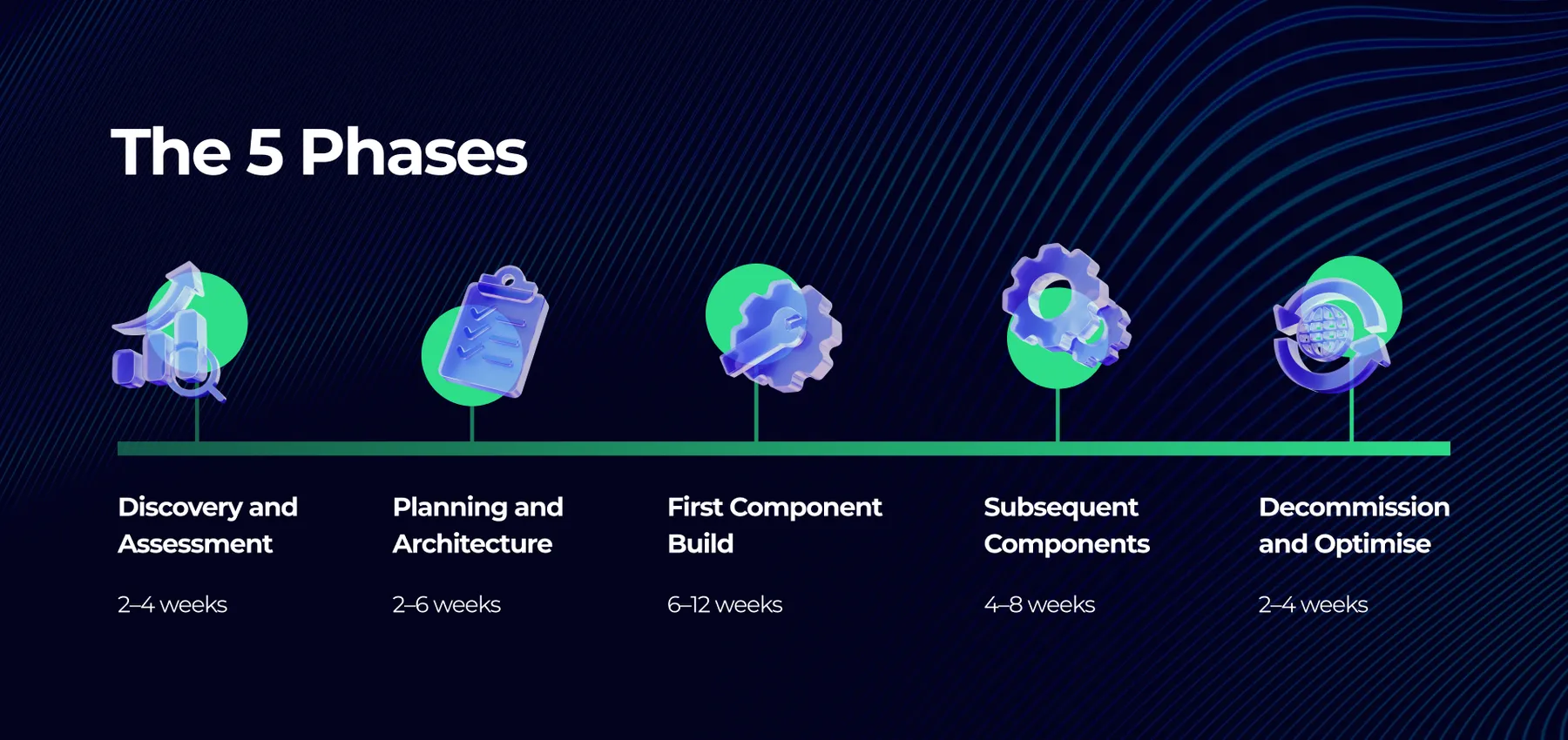
Phase 1: Discovery and Assessment (2–4 weeks)
Before any development begins, the existing system needs to be understood. This phase generates the data that informs every subsequent decision: what the system does, how its components connect, where the data lives, what the dependencies are, and what the highest-risk areas are.
The deliverable is an assessment report with a prioritised list of components, a map of dependencies, and an initial recommendation on approach and sequence. The UK Government's Legacy IT Risk Assessment Framework uses exactly this prioritisation logic, rating systems by risk level to determine the sequence for modernisation: highest-risk components first, lower-risk components in subsequent phases. If the existing system is well-documented and the team is available to answer questions, this takes two weeks. If there is no documentation and the knowledge lives with one or two people who are difficult to reach, it takes four. In either case, the output is the same: a clear picture of what you have before anything is changed. For more on what this looks like in practice, see our guide to mapping legacy system dependencies.
Phase 2: Planning and Architecture (2–6 weeks)
With the assessment complete, the project can be planned properly. This phase defines the target architecture, the order in which components will be migrated, the data migration strategy for each component, and a phased roadmap with milestones and decision points.
Planning is the phase that organisations most often try to shorten, typically because it does not produce visible output. However, that leads to poor planning and can yield visible results, yet nobody is satisfied with the outcomes: scope that expands mid-project, unanticipated integrations, and timelines that slip. Two to four weeks of careful planning saves months of rework. For a detailed description of how we approach this phase, see how we work.
Phase 3: First Component Build (6–12 weeks)
The first component always takes the longest. It involves building the new module, establishing the infrastructure (routing layer, deployment pipeline, monitoring setup) that all other components will use, migrating the data for that component, running old and new in parallel, and managing the cutover.
A billing module in a typical SMB context: six to eight weeks of build, two weeks of parallel running where both the legacy and new billing systems process the same transactions and the results are compared. Any discrepancy is investigated before the migration proceeds. As soon as results are consistent, the cutover occurs, and the legacy billing module is decommissioned; eight to twelve weeks in total. The team is learning the system, solving problems that were not visible during the assessment, and building foundations that would expedite every subsequent legacy application modernisation.
Phase 4: Subsequent Components (4–8 weeks each)
Each component that follows the first one benefits from the knowledge and skills acquired during phase three. The infrastructure is in place, the deployment process is established, and the team knows the patterns. Data migration becomes more predictable because the team has done it before, and the data quality issues in the source system are now understood.
First component: twelve weeks. Second: eight. Third: six. Fourth: four to five. The acceleration is real and consistent. A project that looks like eighteen months on paper often delivers its third or fourth component ahead of schedule because the early investment in infrastructure and process pays dividends across every subsequent phase.
Phase 5: Decommission and Optimise (2–4 weeks)
Once the final component has been migrated and validated, the legacy system replacement is complete, and it can be switched off. During this phase, the legacy infrastructure is decommissioned, the temporary integration bridges that connected the old and new during parallel running are removed, the legacy data and codebase are archived, and the documentation for the new system is completed.
It is easy to treat decommissioning as an afterthought once the new system is live, but the work here, particularly the removal of temporary integrations built during parallel running, is what prevents the new system from accumulating its own technical debt from day one.
What Speeds Things Up
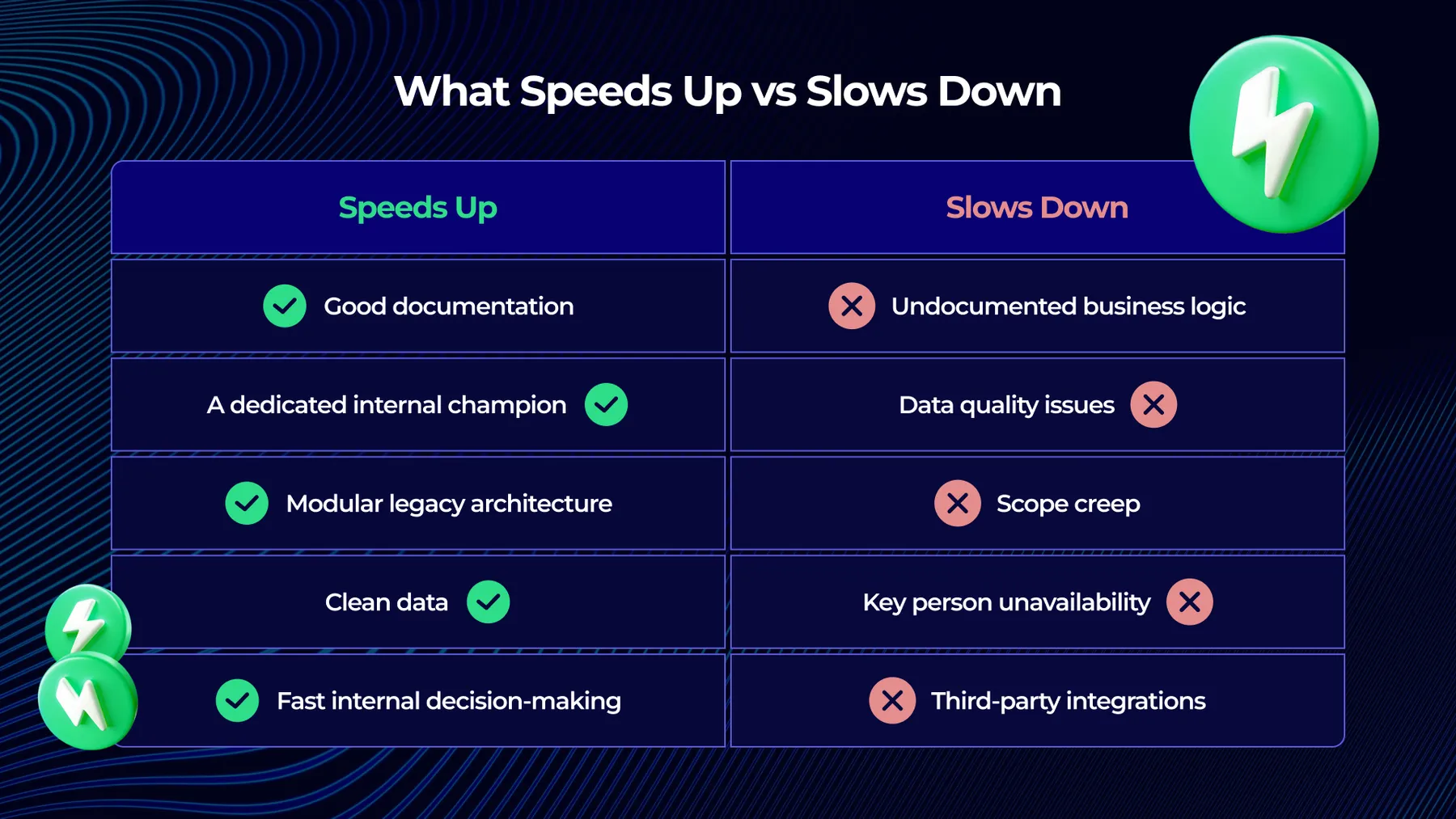
Good documentation. If the existing system has clear documentation, the assessment phase goes significantly faster, and the team encounters fewer surprises during build.
A dedicated internal champion. Within your business, there has to be one person who knows the system well, is available to answer questions, and possesses the authority to make decisions. Without this, the project waits on the business rather than the other way around.
Modular legacy architecture. Systems where components can be clearly separated are faster to modernise than systems where everything is tightly coupled. The strangler fig approach depends on being able to draw boundaries around components.
Clean data. Clean, consistent data makes migration manageable, while data that has accumulated inconsistencies over years adds weeks per component.
Fast internal decision-making. The speed at which decisions are made regarding architecture, migration strategies, and approval to proceed after parallel running determines whether the project moves at the pace of the development team or the organisation's approval procedures.
What Slows Things Down
Undocumented business logic. VBA macros that encode calculation logic, database triggers that no one remembers writing, and conditional logic constructed for a single client requirement in 2014 are examples of the rules that accumulate over the years in legacy systems. Finding and replicating this logic is the most time-consuming part of most legacy system modernisation projects. A project estimated at four months has stretched to nine because the team kept discovering business rules embedded in code that had no comments, no documentation, and no one who fully remembered why they were there.
Data quality issues. Duplicate records, missing fields, inconsistent formats, data entered manually over years without validation. Every quality issue is a decision during migration: fix it, migrate it as-is, or exclude it. These decisions take time, and there are usually more of them than expected.
Scope creep. The most common timeline-killer is the phrase "while we're at it." Adding requirements mid-project extends every subsequent stage, so the scope defined at the end of planning should be treated as fixed for that phase.
Key person unavailability. The person who knows how the legacy system works takes a month off in month two, the supplier who built the original integration is no longer in business — these dependencies are risks that planning should identify and contingency should cover.
Third-party integrations. When migration depends on a third-party vendor changing something on their end, the timeline has to consider the vendor's timeline, too. Payment providers, logistics APIs, and accounting software vendors all have their own development and release schedules, which are not going to be adjusted per client's request.
Three Real-World Timeline Scenarios
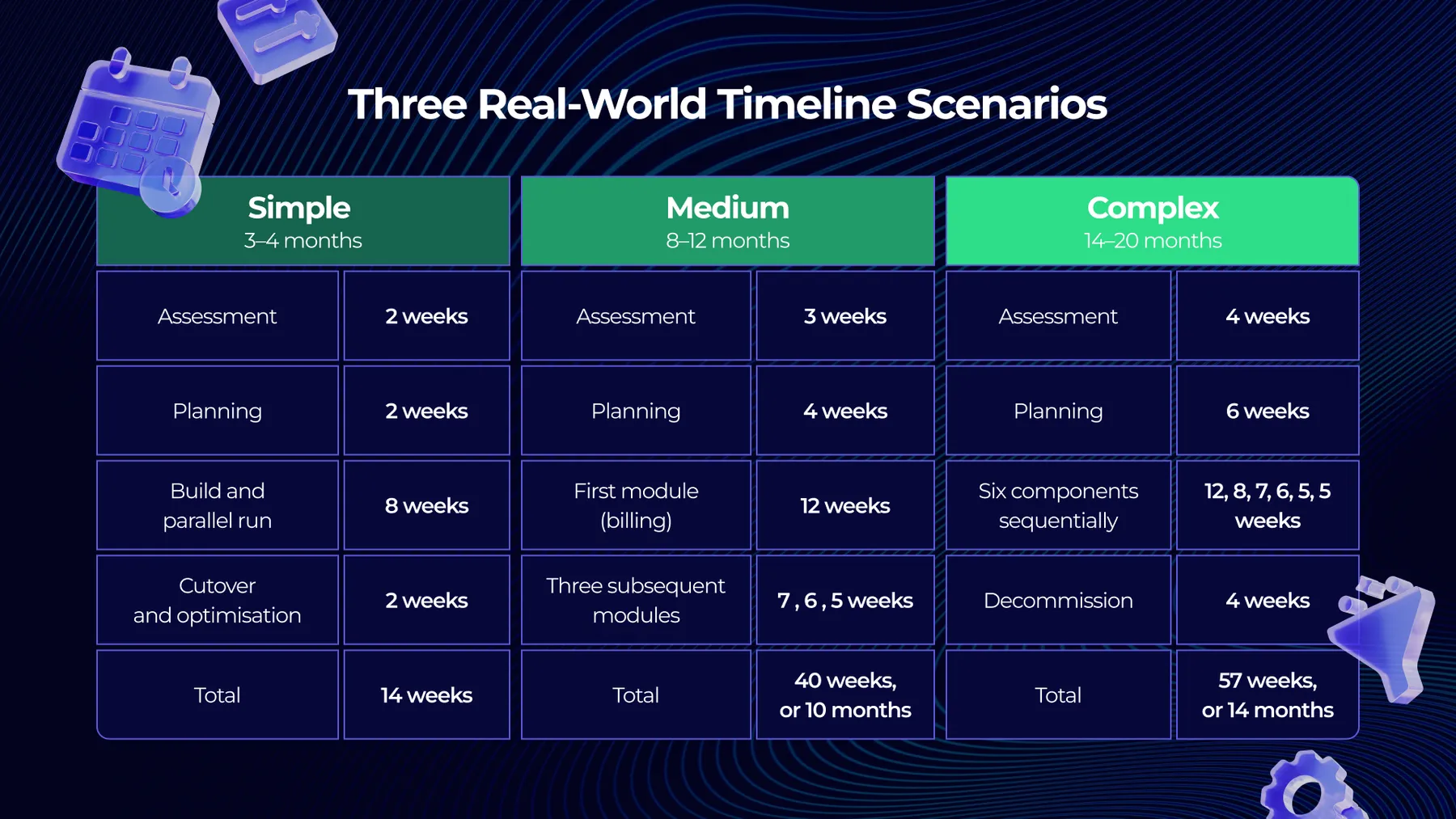
Scenario A: Simple (3–4 months)
A distribution company with 30 employees running an Access database for order management. Single system, clear logic, relatively clean data, one team of users. Assessment: 2 weeks. Planning: 2 weeks. Build and parallel run: 8 weeks. Cutover and optimisation: 2 weeks. Total: 14 weeks. For more on this type of migration, see our guide to Access database replacement.
Scenario B: Medium (8–12 months)
A manufacturing business with 80 staff running a legacy ERP with four modules: billing, inventory, CRM, and reporting. Several modules contain custom business logic built up over ten years. Strangler fig approach, module by module, starting with billing. Assessment: 3 weeks. Planning: 4 weeks. First module (billing): 12 weeks. Three subsequent modules: 7 weeks, 6 weeks, 5 weeks. Decommission: 3 weeks. Total: approximately 40 weeks, or ten months. The business sees its first working new component at week 19.
Scenario C: Complex (14–20 months)
A professional services firm with 150 staff running multiple interconnected legacy systems accumulated over fifteen years: a core application, two custom integrations, and a reporting layer, each with dependencies on the others. Compliance requirements add testing overhead to every phase. Assessment: 4 weeks. Planning: 6 weeks. Six components sequentially: 12, 8, 7, 6, 5, 5 weeks. Decommission: 4 weeks. Total: approximately 57 weeks, or fourteen months. First value: month four, when the first component goes live, and the business immediately sees operational improvement in that area.
The "Time to First Value" Mindset
The question most managing directors ask is "how long will this take?" though the more useful question for board conversations is "when will we see the first result?"
On a phased legacy system modernisation, the first component is in production within two to four months of the project starting, regardless of how long the full programme takes. The business is not waiting eighteen months for anything. As Martin Fowler notes in his writing on the strangler fig approach, once each new component is working, the business can reap the value from it, allowing earlier return on the investment before the full programme is complete.
This framing changes the board conversation, so instead of asking for an eighteen-month commitment, you are asking for a three-month commitment to a first result, with a plan for what comes after. It also changes the risk profile: if the first component does not deliver what was expected, the programme can be adjusted before the full investment is committed. For more on this approach, see our guide to the strangler fig pattern.
How to Modernise Legacy Systems with AI
AI tooling is beginning to affect certain phases of legacy modernisation, and it is worth being direct about where.
The assessment phase benefits most. It takes less time to comprehend an undocumented system when you have tools that can scan a legacy codebase and create a structured map of what the code does. Work that previously required a senior developer spending two to three weeks reading code can in some cases be expedited significantly, particularly for systems written in common languages.
In the build phase, McKinsey's research on gen AI-assisted modernisation reports 40–50% acceleration in tech modernisation timelines and a 40% reduction in technical debt-related costs. These numbers represent large-scale initiatives with significant investments in AI tools; for an average SMB project, the benefits are genuine but more limited, and they apply mainly to clearly defined implementation tasks rather than to data migration, architecture choices, or business logic discovery.
Understanding the business context of the system being replaced, choosing which functionality to replicate versus redesign, managing the transition from a legacy system to a new one, and confirming that the new system generates accurate results are all things that AI cannot alter. These remain human work, and they account for a significant portion of every project's timeline.
Key Takeaways
- Legacy modernisation for a UK SMB typically takes 3 to 18 months, but the first results will arrive within 2–4 months on any project applying a phased approach.
- The five phases are: discovery and assessment (2–4 weeks), planning and architecture (2–6 weeks), first component build (6–12 weeks), subsequent components (4–8 weeks each), and decommission (2–4 weeks).
- The factors that most reliably extend timelines are undocumented business logic, data quality issues, scope creep, and key person unavailability.
- Each component after the first is faster than the one before; the acceleration is consistent and predictable.
- The best way to get a reliable timeline for your specific system is to start with an assessment: the numbers become much clearer once someone has actually looked at what you have.