
What Is Dependency Mapping?
Dependency mapping is the process of documenting all the connections a legacy system has to other systems, databases, business processes, users, and infrastructure, so that a migration can be planned with a clear understanding of what will be affected and in what order.
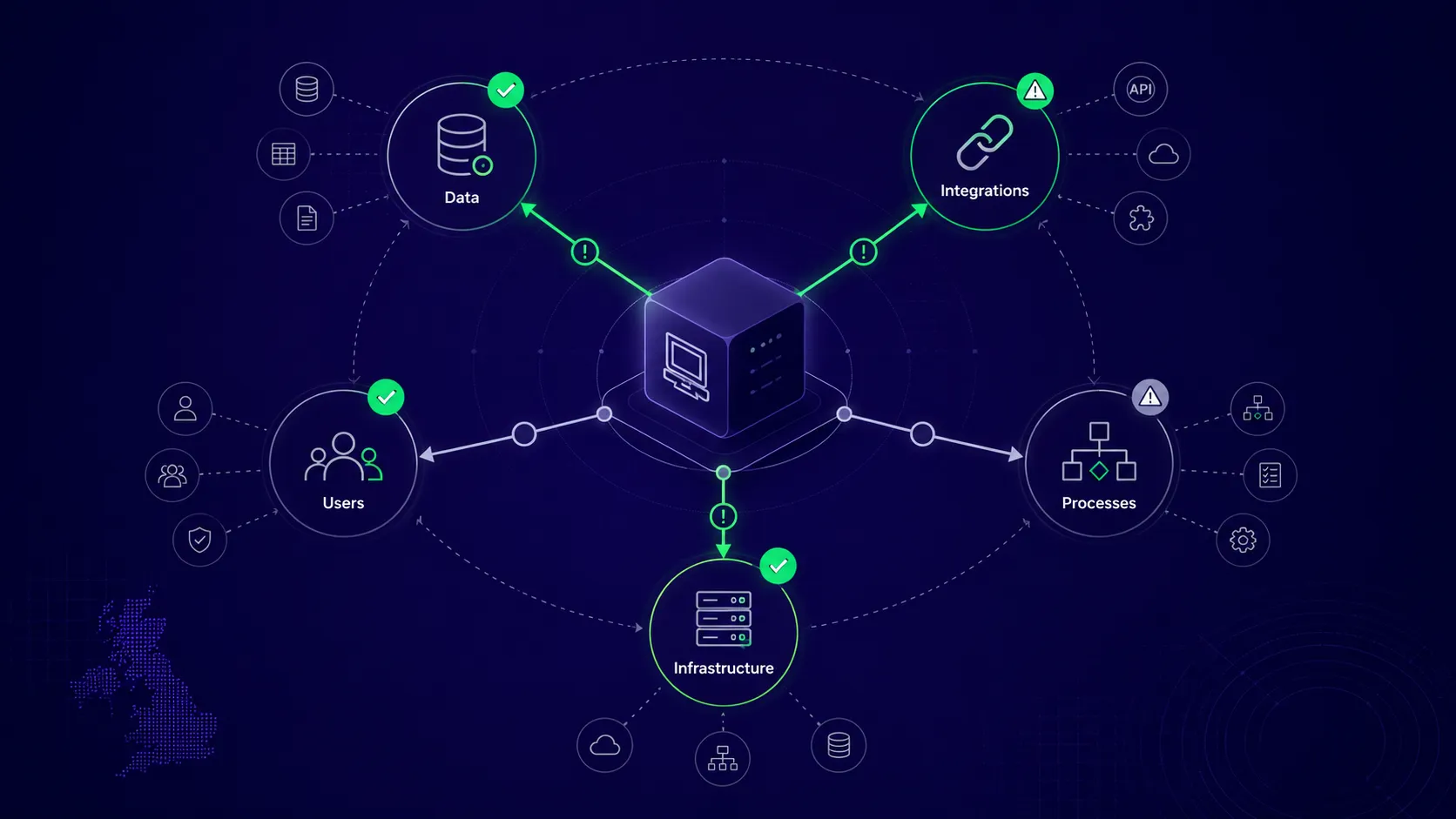
What Is Dependency Mapping (and Why It Matters for Migration)
Think of a legacy system like the plumbing in an old building: before any renovation work begins, a competent contractor will map where the pipes run, which walls are load-bearing, and where the electrics are buried. If that step is skipped, the renovation turns into a series of expensive surprises.
A legacy system sits at the centre of a web of relationships: some documented, most not. Data flows in and out, other systems depend on it, business processes have grown around it over years, and underneath it all, there's infrastructure. A dependency map makes that web visible before anything is disturbed.
Martin Fowler's Patterns of Legacy Displacement describes this as finding the right seams in the current business and technical architecture, and understanding how one large technical solution meets multiple business needs. The NCSC's guidance on identifying critical assets makes the same point from a security perspective: knowing which systems are connected, their dependencies, who has access, and who manages each component is critical to recovering from incidents and managing risk effectively.
For a migration, the dependency map determines several critical points: what will break if the system is taken offline, which integrations need to be rebuilt, which business processes are invisible in the code but critical to operations, and what a realistic timeline and budget actually look like. Most migration projects that run into trouble do so because one of these was unknown at the start.
The 5 Types of Legacy System Dependencies
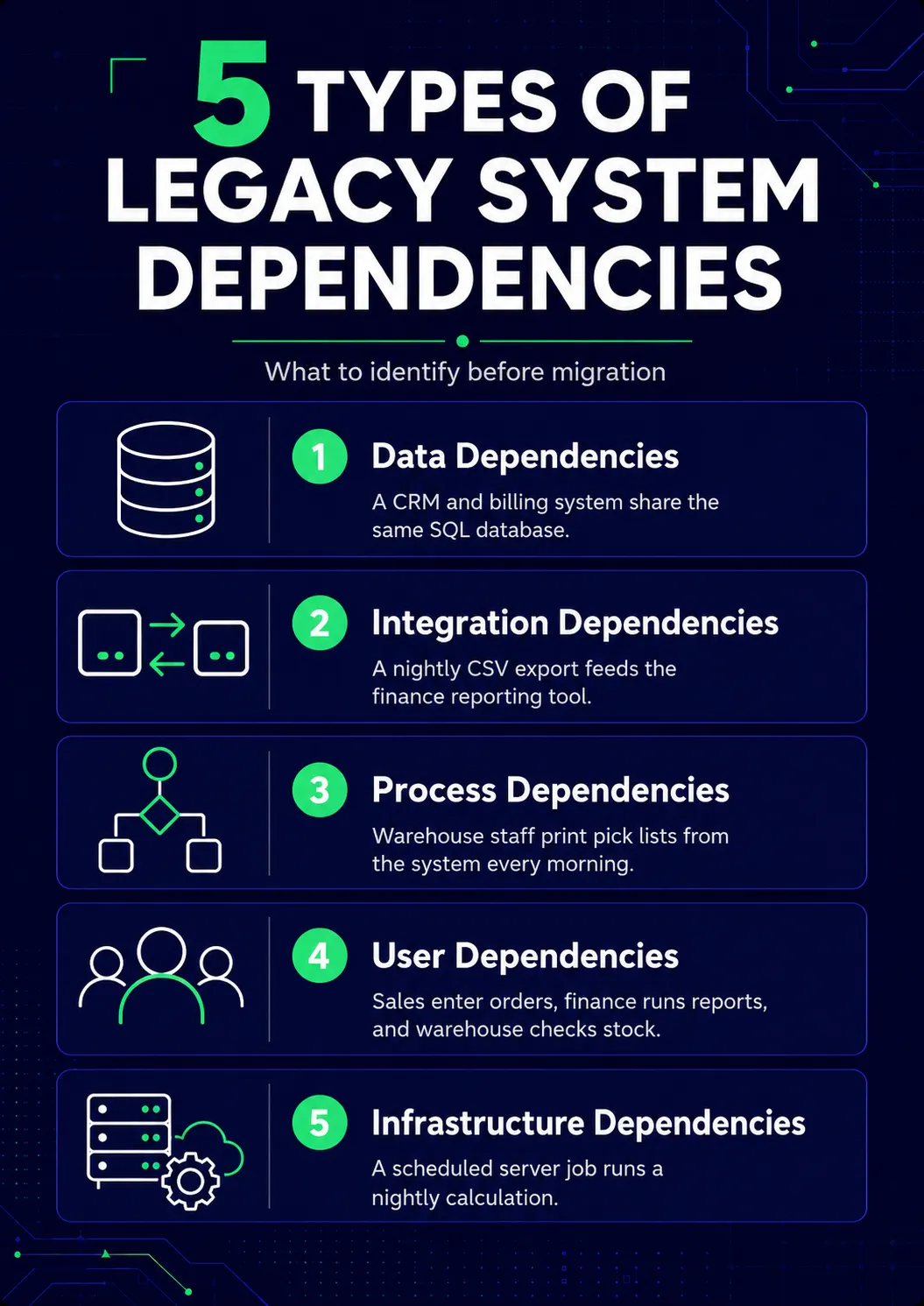
1. Data Dependencies
Legacy systems frequently share a database with other applications. This pattern was common in older architectures, and it creates significant migration complexity. A legacy CRM and a billing system both reading from and writing to the same SQL database is a data dependency: even though billing has never been touched, the billing system would break when the CRM is migrated to a new data structure. Identifying shared tables, shared schemas, and shared data stores is the first priority in any legacy data migration exercise.
2. Integration Dependencies
Integration dependencies are the connections between the legacy system and external or internal systems: APIs, file-based exchanges (SFTP, CSV imports and exports), webhooks, direct database connections to third-party systems. These are often poorly documented, particularly in systems built before modern API standards became common, and they are central to any legacy system integration review.
Imagine there's a scheduled CSV export that runs every night and is picked up by the finance team's reporting tool — that is an integration dependency. It does not appear in any formal documentation, and the finance team calls it "the file that arrives every morning." If the migration removes the process that generates it, the file no longer arrives.
3. Process Dependencies
Process dependencies are business workflows that rely on the legacy system but are not reflected in the code or documentation. This is undoubtedly the most underestimated type of dependency.
Think about a warehouse team that prints pick lists from the legacy system at 7:00 every morning — that is a process dependency. The system generates the list; the team collects it; the day's work is organised around it. None of that is documented anywhere, but if the migration eliminates the pick list function without taking this workflow into account, the warehouse will stop working the morning after go-live.
4. User Dependencies
It's quite common for various groups within the same organisation to use the same system in different ways: a sales team applies it to enter orders, a finance team runs end-of-month reports, and a warehouse team checks stock levels. To comply with the specific needs of each team, the migration timeline has to account for their critical usage periods: finance's month-end, sales' peak ordering, and warehouse shift changes.
5. Infrastructure Dependencies
Infrastructure dependencies are the technical components that allow the system to function: the operating system and server configuration, the version of the runtime or database engine, scheduled tasks, Windows services, certificates, and software licences.
A legacy system running on Windows Server 2012 with a Windows Task Scheduler job that executes a nightly calculation at 2:00 am has infrastructure dependencies that will not automatically transfer to a new environment. The application can be moved, but if the scheduled task is not recreated, the nightly calculation will cease to operate, though the consequences may not be visible until the following morning.
A Step-by-Step Process for Mapping Dependencies
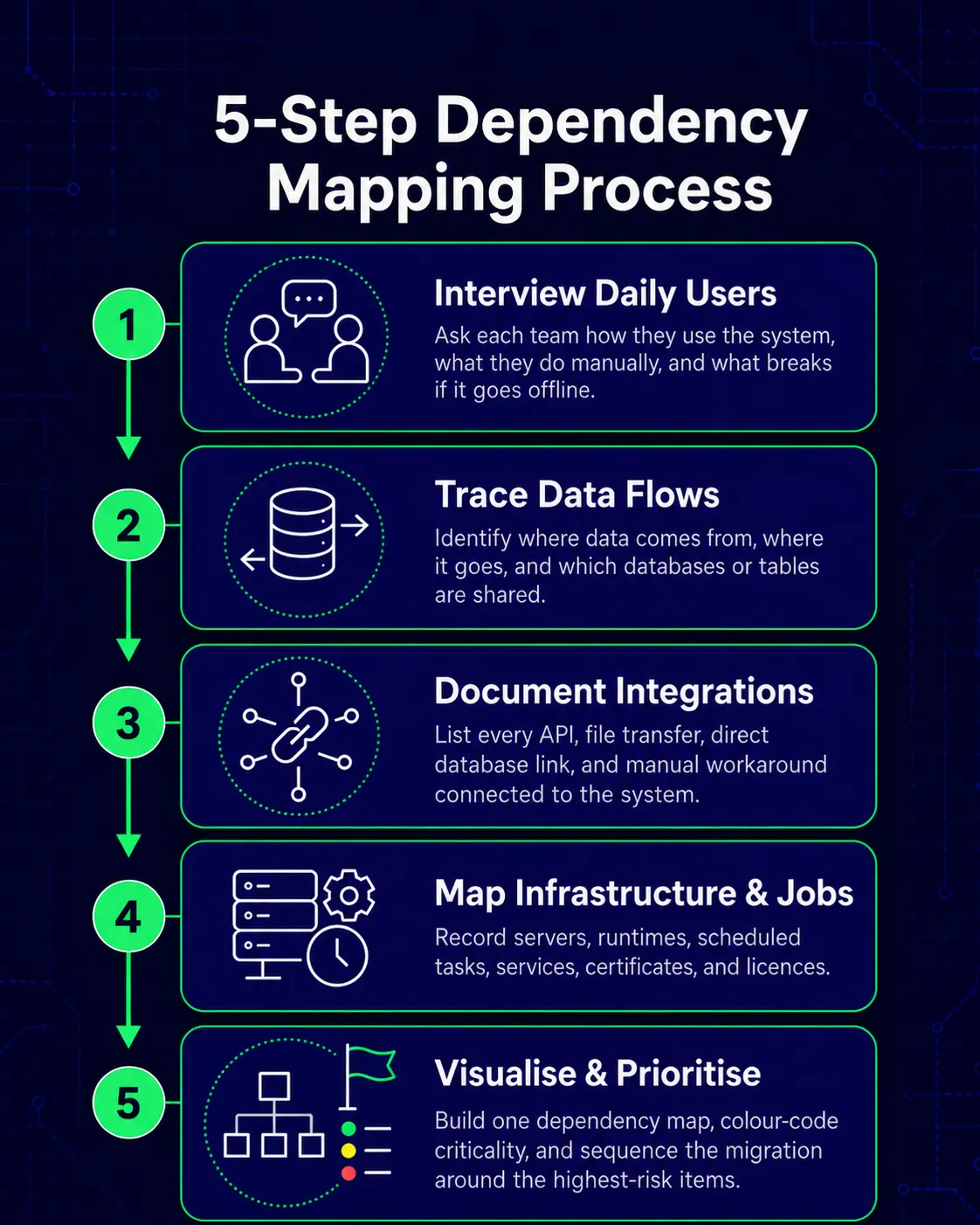
Step 1: Interview the People Who Use the System Daily
Do not start with the code or the documentation. For most legacy systems, the documentation is either absent or out of date, and the code fails to capture process or user dependencies.
Talk to representatives from every team that touches the system. Ask what they use it for, what their daily or weekly routines involve, and what would happen to their work if the system were unavailable for an hour, a day, or a week. Ask specifically about anything they do manually, as these processes are where the invisible dependencies hide: exports they run, reports they print, and files they send.
Step 2: Trace Data Flows In and Out of the System
Follow the data: where does it come from, and where does it go? As the Revert to Source pattern in Fowler's legacy displacement work observes, tracing the originating sources and sinks for key data flows is a core requirement of any legacy displacement effort, not an optional preparatory step.
It's best to check which databases the system reads from and writes to, and which other systems connect to the same databases. Look at scheduled imports and exports, identify manual data entry points where staff copy information from one system into another — that is usually a sign of an integration that was never built properly.
Step 3: Document Integrations and Connections to Other Systems
Build a list of every integration the legacy system has, formal and informal. For each one, record what the connected system is, how the connection works (API call, file transfer, direct database link, manual process), how frequently data is exchanged, and what breaks if the connection fails. Assign a criticality rating: high, medium, or low. This drives the migration sequence.
| Connected System | Integration Type | Frequency | Criticality | Owner |
|---|---|---|---|---|
| Sage accounting | Shared SQL database | Real-time | High | Finance / IT |
| Warehouse system | Nightly CSV export | Daily | High | IT |
| External courier | API call on order despatch | Per transaction | High | IT |
| Management reports | Manual Excel export | Weekly | Medium | Operations |
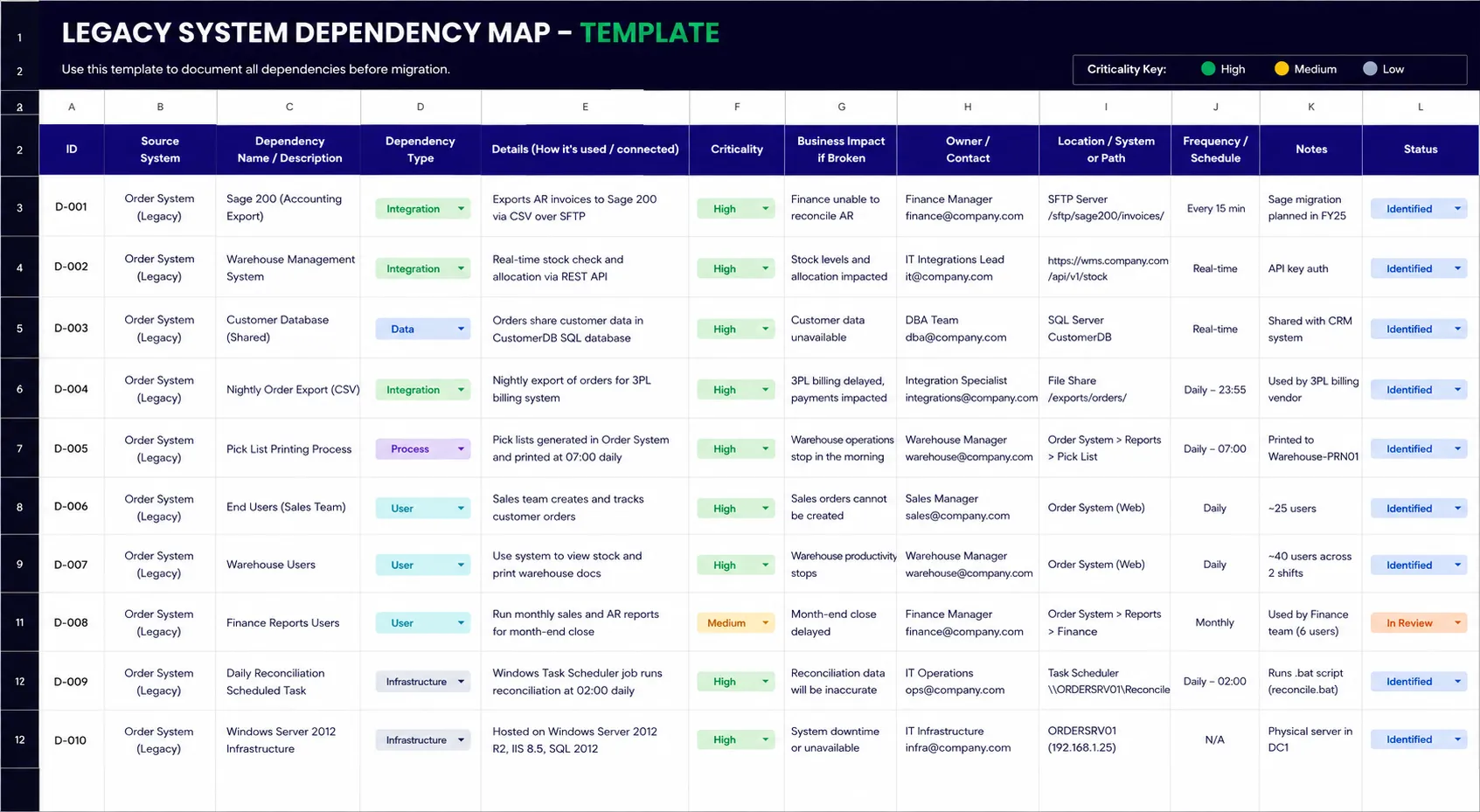
Step 4: Map Infrastructure and Scheduled Jobs
Look at Windows Task Scheduler or the Linux crontab on the servers that host the system, review Windows Services and any middleware processes, and check for licences or certificates tied to the current infrastructure. Many legacy systems have automated jobs that nobody remembers setting up but which are critical to daily operations. These are usually things like a midnight database backup, a morning report generation, or an end-of-day reconciliation.
Document each scheduled job: what it does, when it runs, what it produces, and who would notice if it stopped.
Step 5: Visualise and Prioritise
Consolidate everything into a single dependency diagram. A whiteboard sketch with boxes and arrows, or a diagram in Miro or Lucidchart, is sufficient. Show the legacy system at the centre, with each dependency type radiating outward: the databases it shares, the systems it connects to, the teams that depend on it, and the infrastructure it runs on. Colour-code by criticality. High-criticality dependencies get addressed first, and the migration sequence follows from the map.
A Practical Example: Mapping Dependencies in an SMB Order System
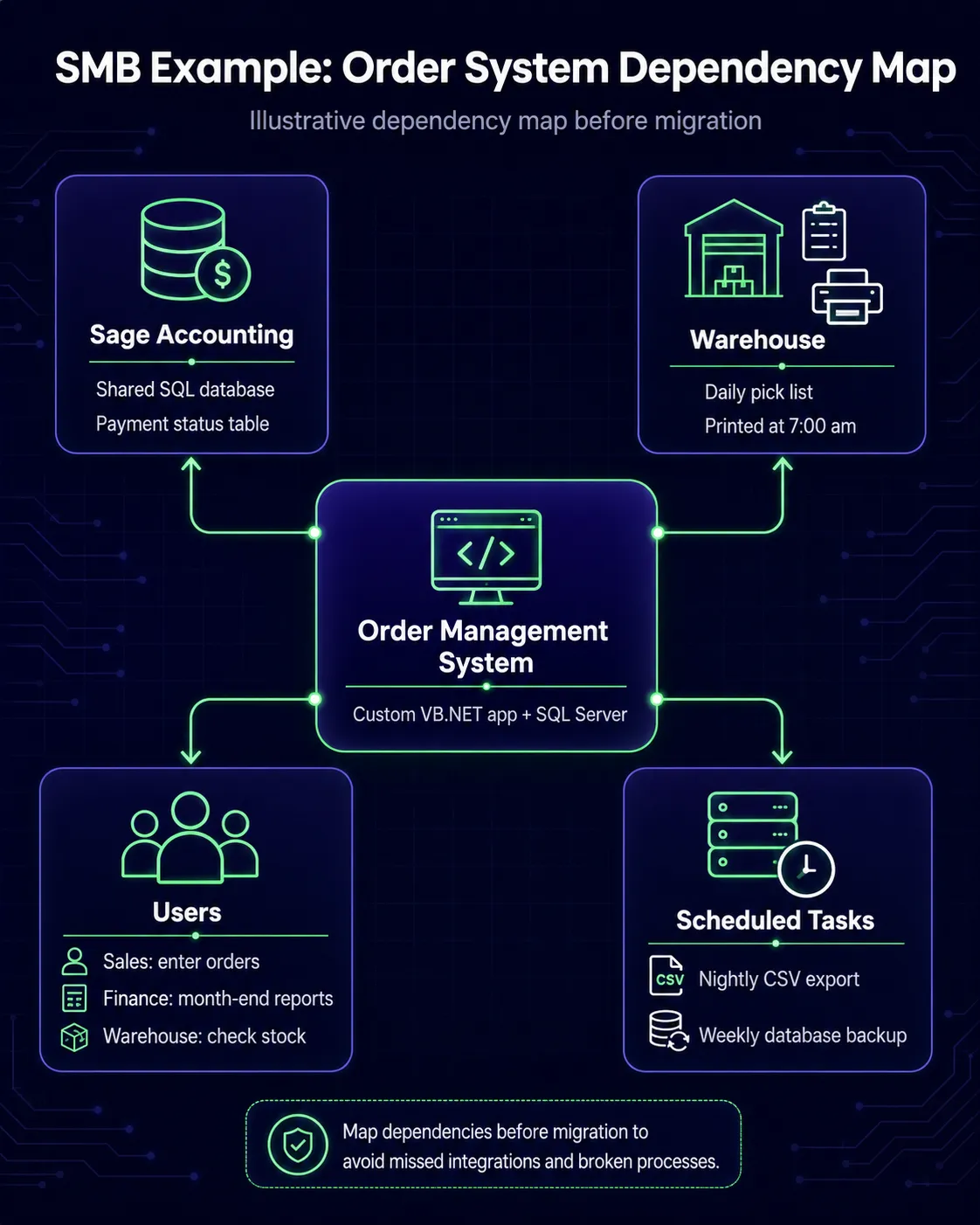
To illustrate the practical application of this process, consider a UK distribution company with 45 employees that had been operating a custom-built order management system for eleven years. The system was a VB.NET application on Windows Server 2012 and a SQL Server database.
The interviews revealed three team dependencies that were not documented anywhere. Sales entered orders through the main interface. Finance ran end-of-month reports directly from the database using saved queries. The warehouse printed a daily pick list at 7:00 am using a legacy print function built as an afterthought, not mentioned in any technical documentation.
Data flow tracing surfaced two more. Sage shared the SQL Server database; both programs read a payment status table, and any changes to the schema would interfere with Sage's reconciliation process. A CSV file was exported to an SFTP server by a nightly batch job, which was retrieved by the logistics provider each morning.
The infrastructure review found two Task Scheduler jobs that nobody on the current IT team knew existed — one for the nightly CSV export, one for a weekly database backup — and an SSL certificate expiring in six weeks.
The resulting map showed the Sage database integration as the highest-criticality dependency, and the logistics export was second. The pick list process needed rebuilding before the warehouse could transition. The SSL certificate was an immediate action item regardless of the migration timeline.
This example is illustrative. The specifics will vary, but the structure of the process is consistent.
Common Mistakes When Mapping Dependencies
Starting with the code rather than the people. Code shows technical connections but not process dependencies or informal workflows. ThoughtWorks notes that overlooking the people who hold legacy knowledge leads to misaligned designs and last-minute scope shocks. Start with interviews, then use the code to verify.
Assuming the documentation is current. Legacy systems accumulate years of changes rarely reflected in documentation. A data flow diagram from 2018 is a starting point for conversation, not a record of fact.
Missing shadow processes. Manual exports someone runs every Friday, data copied into a spreadsheet and emailed to a manager, a report printed and filed rather than stored digitally — ask specifically about anything people do manually.
Treating the map as a one-time exercise. Build in a review step at the start of each migration phase, particularly if a business still actively uses the system while migration is underway.
Underestimating data dependencies. Shared databases, inconsistent data formats, years of accumulated quality issues, and undocumented data relationships create migration risk that is difficult to anticipate without thorough mapping.
Tools and Approaches for Dependency Mapping
For most SMBs with one to three legacy systems, a structured spreadsheet and a visual diagram are sufficient. For businesses with more complex environments, automated discovery tools such as ServiceNow Discovery or Datadog can scan the network and identify connections automatically, providing a starting point that interviews then enrich with process context.
How Dependency Mapping Connects to Migration Planning
Creating a dependency map is the first step of the planning process, not the last. It drives the migration sequence, since high-criticality dependencies must be addressed before the components they connect to are moved. As a result, it tells you which connections need to be temporarily bridged during parallel running and shapes the rollback plan. Every dependency is a possible failure point, and if you know what they are ahead of time, you can plan for them instead of finding out the hard way.
The map also informs the architectural approach: see our guide to the strangler fig pattern for how the dependency map shapes a phased migration, and our guide to rewrite vs. modernise for how dependencies influence that decision.
Dependency mapping is the first step in the assessment work Hollinford carries out at the start of any legacy modernisation engagement. For more on how that process works in practice, see how we work, or the legacy modernisation service page.
Key Takeaways
- Legacy systems are never isolated. They connect to databases, other systems, business processes, users, and infrastructure in ways that are rarely fully documented.
- Five types of dependencies to map: data, integration, process, user, and infrastructure. Process dependencies are consistently the most overlooked.
- Start with interviews, not code. The people who use the system daily know things that are not visible anywhere in the technical environment.
- The dependency map determines the migration sequence, the interim integration requirements, and the rollback plan.
- For most SMBs, a structured spreadsheet and a clear diagram are sufficient. Completeness matters more than sophistication.