
Pegasus Opera 3 runs the finances of a great many UK distributors, manufacturers, and wholesalers, and the teams who use it every day tend to know it inside out. It was never designed as a hub for websites or outside software, though, so a business that has relied on it for years often ends up with a second, informal system running alongside. Typically someone types website orders in by hand, and stock figures end up in two places, so the monthly report gets rebuilt in Excel.
In most cases that second system can be retired while Opera 3 stays where it is. There are several workable ways to connect it to the rest of your software, and the right one depends on what you're connecting and how often the data needs to move.
Why Opera 3 Integrations Aren't Always Straightforward
Opera 3 belongs to an earlier generation of business software. Pegasus has been building accounting and business systems for around four decades, and Opera 3 is a long-established, on-premise product, installed on a company's own server or with a hosting partner. Software of that era was built to keep data safely inside the business, which is why links to the outside world tended to arrive later, one project at a time.
Modern cloud platforms publish open, documented APIs that a developer can pick up straight away. With Opera 3 the options are narrower and less visible, and they also depend on your edition. The standard edition keeps its data in Visual FoxPro tables, while Opera 3 SQL SE runs on Microsoft SQL Server. That difference shapes which integration methods each edition supports.
Integration is perfectly possible, provided the method is chosen with some care. The route that looks cheapest on paper isn't always the one still working after a year of daily use. For more on the platform itself, see our Pegasus Opera 3 overview.
Connecting Opera 3 to Your Website
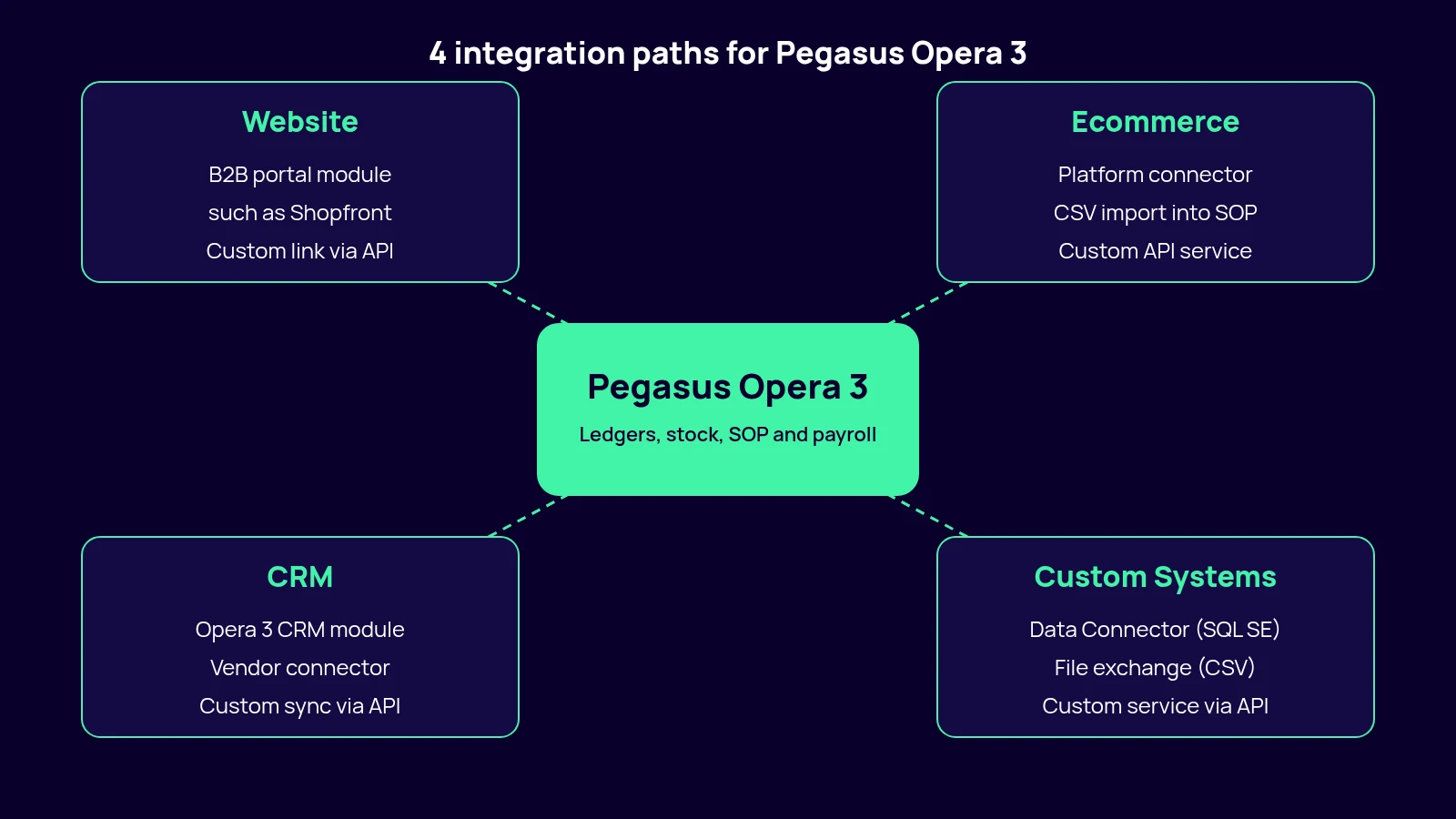
"Website" can mean quite different things. A brochure site that collects enquiries needs almost nothing from Pegasus Opera 3, whereas a trade portal needs a great deal. Account customers expect to log in and see their own prices, credit status, open invoices, and live stock, all of which sits in Opera 3's sales ledger, stock control, and Sales Order Processing (SOP) modules. For a B2B portal, the common route is a web platform built to work with Opera 3, where each customer login maps to a sales ledger account and an order placed online arrives in SOP like any other sales order. Pegasus's own add-on directory lists a few of these, Shopfront Ecommerce among them, and they work well if your trade ordering follows a fairly standard pattern.
Pegasus Web Xchange sometimes comes up here too. It gives your own staff remote access for mobile sales orders, timesheets, and payroll self-service. However, it isn't a customer-facing website.
If your site already runs on a platform with its own API, a custom link tends to be simpler, since only the Opera 3 side needs bespoke work. Sites built in-house years ago, with no API and little documentation, take longer because the connection has to be designed at both ends.
ERP Ecommerce Integration: Shopify, WooCommerce, and Bespoke Platforms
With an online shop, volumes are higher and customers see mistakes straight away, which puts more weight on the ERP ecommerce integration behind it. It needs to keep the shop's stock levels in line with the Opera 3 stock ledger, otherwise you end up selling items that have already gone. Prices should come from Opera 3 as well, trade pricing included where the shop supports it, so nobody maintains a second price list. Each web order then has to reach SOP with the customer, lines, delivery charge, and payment reference attached, ready for the warehouse to pick like any phone order.
Some ecommerce platforms, mostly those built for B2B trade, have connectors that do all of this in near real time. For Shopify and WooCommerce, a maintained Opera 3 connector is harder to find than most people expect. If one is offered, ask to see it working on a setup like yours first.
Where there's no connector, the simplest route is a file-based exchange: the shop exports orders as CSV or XML, a small script converts them if needed, and Opera 3's Import Wizard brings them into Invoicing/SOP, checking each record and reporting anything it rejects. Because the importer also runs from the command line, the whole cycle can be scheduled. File imports do need some care. If the importer is set to overwrite existing records, a badly prepared file can blank out fields that were never meant to change. The wizard can do a trial run that changes no data, and checking its audit report before going live avoids most surprises.
Working with the database directly is quicker to build but bypasses some of Opera 3's own validation, so it needs someone who knows the table structures well. For heavier traffic, a custom service between the shop's API and Opera 3 can translate data in both directions, with error handling built in.
A typical example is a distributor where someone re-keys website orders into Opera 3 first thing every morning, so anything ordered after that session waits a full day before it can be picked. A scheduled import that runs through the day closes most of the gap without any change to the website.
ERP CRM Integration: Opera 3 CRM and Third-Party Systems
Before looking at outside CRMs, it's worth checking whether you need one. Pegasus Opera 3 has its own CRM module, and nothing external sits closer to the finance data. It shares company records with the sales and purchase ledgers and works with Financials and Supply Chain Management, so a quotation can become a sales order without re-keying. It also links to Outlook for emails and diary appointments, and to Word and Excel for mailshots and reports. If your sales team mainly needs balances and order history in front of them, it may be enough to switch the module on.
Many companies, though, already run a separate CRM that sales and marketing are happy with, and moving those teams into Opera 3 isn't realistic. In that case, the first job of an ERP CRM integration is usually to keep customer accounts and contacts in step between the two systems. Most sales teams also want to see Opera 3 orders and invoices without leaving the CRM, and some businesses go further, so that a won deal becomes a sales order automatically.
Ready-made Opera 3 connectors from CRM vendors, which mostly handle financial data, are a good place to start because someone else maintains them. Where there's no connector, or only one that syncs accounts and not orders, a custom integration can fill the gap through the CRM's API and Opera 3's import routines or database.
A large part of the work is to agree which system owns which field. If both systems believe they own a customer's address, they will overwrite each other repeatedly, and the problem often stays hidden until an invoice goes to the wrong place.
Custom Systems, Third-Party Software, and the Pegasus Opera 3 API
Beyond websites and CRM, businesses often want Opera 3 to exchange data with warehouse management systems, BI tools, payment gateways that post receipts against invoices, HR platforms, and carrier software that prints labels from sales orders. The same test applies to each of them.
If the other system has a documented API, an integration is technically achievable, and what remains is a question of scope. A one-way nightly export of stock figures to a BI tool is a small job. A two-way link with a WMS is a proper project, because stock moves in both directions and a single mismatch can mean a missed shipment. It needs thorough testing and a named owner once it's live. In some cases it's cheaper to replace the third-party tool with one that already connects to Opera 3 than to build and maintain a bridge to the one you have.
What the Pegasus Opera 3 API offers comes down to the edition you run. On Opera 3 SQL SE, the Data Connector (API), added in 2024, gives tools such as Power BI, Excel, and SharePoint secure, direct access to Opera 3 data, with any custom fields or tables from bespoke work also available. Writing data back into Opera 3 is a different matter and still tends to go through the import routines, a supported add-on, or carefully controlled database work. On the standard edition, integrations generally rely on file exchange and direct reads of the data tables.
A Pegasus Opera 3 cloud setup, through Pegasus Business Cloud or a partner's hosted server, changes where the data lives and how outside services reach it, though the integration options stay much the same. Our Sage 50 integration guide covers the same questions for Sage 50.
How to Decide Which Integration Approach Fits Your Business
Start by finding out whether a maintained connector exists for the system you want to link, and whether it supports your edition and version of Pegasus Opera 3. If it does, that's the place to begin. Your Pegasus Opera 3 support partner is a sensible first call on connector questions, although not every partner takes on integration projects.
Volume and timing come next. Twenty orders a day can move comfortably through a scheduled import, while hundreds an hour, or stock that sells out within minutes, need something much closer to real time.
Budget matters in two ways, since an integration costs money to build and then to keep working through upgrades on both sides. How long you expect to stay on Opera 3 matters just as much, though it rarely comes up early in the conversation. If you're planning to migrate within the next couple of years, a lighter, temporary link is usually the better choice, leaving the larger investment for the new platform. If you expect to stay put, custom work that fits your processes properly is easier to justify.
Ready-Made Connector vs Custom Build
| Factor | Ready-Made Connector | Custom Build |
|---|---|---|
| Best fit | Common platforms with a maintained Opera 3 connector | No connector, or processes a connector can’t handle |
| How it works | The vendor’s sync service, configured for your data | The other system’s API plus Opera 3 imports, database access, or the Data Connector |
| Time to go live | Usually shorter, mostly configuration | Depends on the systems involved, with design and testing |
| Cost | Licence or subscription, lower upfront cost | Higher upfront cost, plus maintenance after go-live |
| Flexibility | Limited to what the vendor supports | Shaped around your own processes |
| Upkeep | Vendor updates it for new versions | Maintained by you or your developer |
When Integration Isn't the Long-Term Answer
A single awkward integration says little about Pegasus Opera 3 itself. Several at the same time are more telling. If your website, CRM, and warehouse system all need custom bridges, each retested whenever either side changes, the upkeep of those bridges can start to cost as much as a move to a platform that connects to them as standard. By then the limiting factor is the age of the core system, and one more connector won't change that.
Opera 3 may well stay the right ledger for years after that, and a phased approach that keeps it running while other parts of the business move can reduce the risk considerably. Before you commission a third or fourth custom integration, though, it makes sense to compare the two paths side by side, and our legacy modernisation page explains how we approach it.
Talk to Us About Your Opera 3 Integration
Tell us what you're trying to connect to Pegasus Opera 3, and we'll tell you honestly whether it's a quick job or a bigger piece of work. A short discovery call is normally enough to see which route fits and whether something simpler would do. Book a free integration consultation.